


Wireless 360° Art Tracing Projector
Wireless 360° Art Tracing Projector
360° Arm Reaches Any Angle Or Surface
Crisp HD Projection For Clean, Easy Lines
Wireless 5G/2.4G, No App Required
USB-C Powered, Ready In Seconds
Stable Locking Base Keeps Lines Steady
Couldn't load pickup availability
I bake and decorate cookies as a side hustle and used to freehand every design, which meant a lot of redos. This projector lets me trace intricate patterns straight onto my icing in minutes, and the arm holds steady the whole time so the lines come out clean on the first try.
How it Works
How it Works
Set the base on your desk, table, or easel and position the 360° flexible arm above your paper, canvas, wall, or cookie. Connect your phone or tablet through your browser over 5G/2.4G WiFi, no app needed, then pick any photo, sketch, or pattern from your camera roll. Use your phone to rotate, scale, and adjust the projection until it's exactly where you want it, lock the arm in place, and trace along the crisp HD outline. It runs on USB-C power, so it's ready to go the moment you plug it in.
What's Included?
What's Included?
- 1x Wireless Art Tracing Projector
- 1x 360° Adjustable Mechanical Arm & Base
- 1x USB-C Power Cable
- 1x Quick Start Guide
Shipping & Return Policy
Shipping & Return Policy
All orders process within 1 to 2 business days and standard shipping arrives within 5 to 9 days for most countries. Every purchase is backed by our 30 day money back guarantee, so you can try the Wireless 360° Art Tracing Projector completely risk free.


FAQs
How do I connect my phone to the projector?
How do I connect my phone to the projector?
Open your phone's browser (no app to download), connect to the projector's 5G/2.4G WiFi signal, and you're in. From there you can pick an image and start adjusting the projection right from your browser.
Does it work in a normally lit room?
Does it work in a normally lit room?
For the sharpest lines we recommend dimming the room a little, similar to any projector, but the HD output is bright enough to trace in most indoor lighting.
Can I use it on a wall, canvas, or cookie?
Can I use it on a wall, canvas, or cookie?
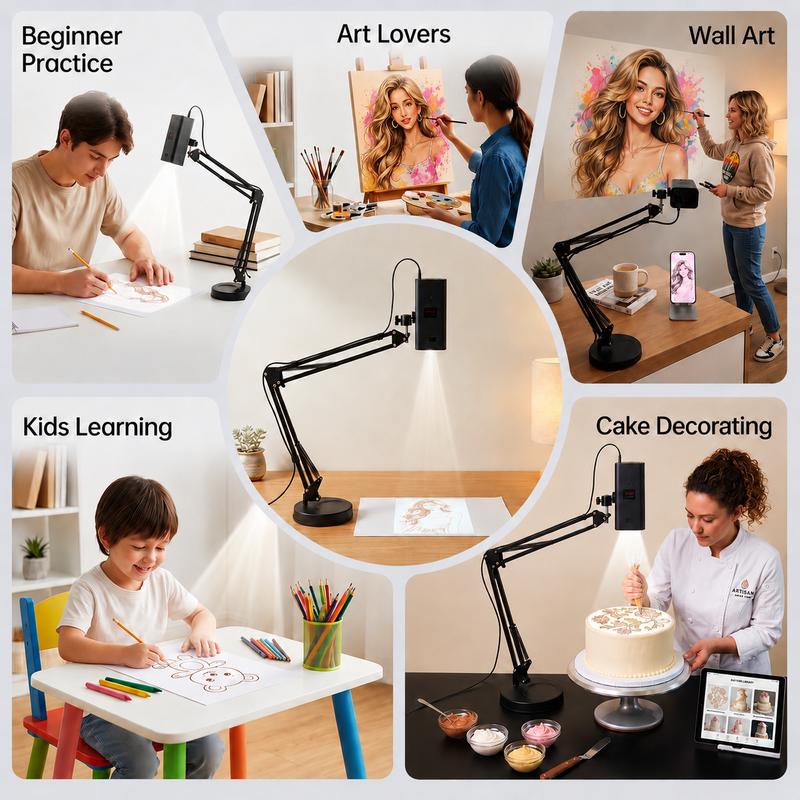
Yes. The 360° arm adjusts to any height, angle, and distance, so you can project onto paper on a desk, a canvas on an easel, a wall for a mural, or icing on a cookie.
What devices does it work with?
What devices does it work with?
Any smartphone or tablet with a web browser and WiFi. There's nothing to install, you just connect and go.
How long does the projector bulb last?
How long does the projector bulb last?
The HD projection unit is built for everyday hobby and craft use and is designed to hold up over years of regular tracing sessions.
What if it's not right for me?
What if it's not right for me?
Try it for 30 days, and if you're not happy for any reason we'll refund you in full under our 30 day money back guarantee.

Trace Any Photo Like A Pro
No more guessing at proportions or redoing lines. This projector turns any photo, sketch, or pattern into a clear outline you can trace with confidence, whether you're a total beginner or just want cleaner results faster.

One Projector, Endless Projects
Sketching, canvas painting, wall murals, lettering, or lining up your next batch of decorated cookies, the 360° arm and wireless setup adapt to whatever you're working on.